Subcanvas - Matlab Usage
Subcanvas Matlab Usage
awe_container
All of the features described above for the Standard Edition continue to work. The Pro Edition adds the possibility of generating the Subcanvas files using scripts. The awe_container object is used as an interface to load containers from file, and to generate container files. The method to generate containers is generate_container.
container = awe_container();
BOOL = container.generate_container(SYS, NAME, OUTPUT_DIR, VERBOSE);
SYS – Top-level Audio Weaver system object.
NAME – base name to use for generating the files.
OUTPUT_DIR – fully qualified path name of the output directory to deposit the 4 files in
VERBOSE – optional Boolean argument which displays logging information to the command line
Changing Container Settings: get_settings / change_settings methods
The current container settings structure is retrieved with the get_settings method, and new settings can be set with change_settings.
cc = awe_container();
SETTINGS = cc.get_settings()

SETTINGS =

    struct with fields:

    containerType: 'Toplevel'
    encryptAWB: 1
    enableAudio: 1
    buildConfiguration: 'release'
    maxMessageLength: 264
    bundlePackets: 1
    requireObjectIDs: 1
    heapPadding: [1000 1000 1000]
    exposeVariables: 1
    version: [1 2 3 4 5 6 7 8]
    comments: {'The first line.'  'The second line'}
To change a setting and apply it back to the container, modify the structure and pass it to change_settings:
% example: change awb to not encrypted
SETTINGS.encryptAWB = 0;
cc.change_settings(SETTINGS);
Most of the items in the structure map exactly to the controls on the Generate Target File dialog. A few new ones are:
-
buildConfiguration – Specify whether you want to use a ‘debug’ or ‘release’ build when generating the Container.
-
maxMessageLength – Maximum size of tuning messages that will be used in the Container. Keep this at 264 unless the target you are deploying on has a different tuning * buffer size*
-
requireObjectIDs – This is reserved, does not do anything
This field in the structure specifies which variables should be exposed:
SETTINGS.exposeVariables = 1;
A value of 0 will not expose any variables, a value of 1 will expose all variables with object IDs \(\ge\) 30000. A value of 2 will expose all tunable variables.
load_container
This function allows you to load a Subcanvas at run-time using Matlab scripts. The function is:
load_container(M, VERBOSE)
where
-
M – Subcanvas object in the signal flow.
-
VERBOSE – optional flow for display progress on the Matlab console.
For example, suppose you have the following top-level signal flow running in Designer. It has a single Subcanvas module named “Subcanvas1”.
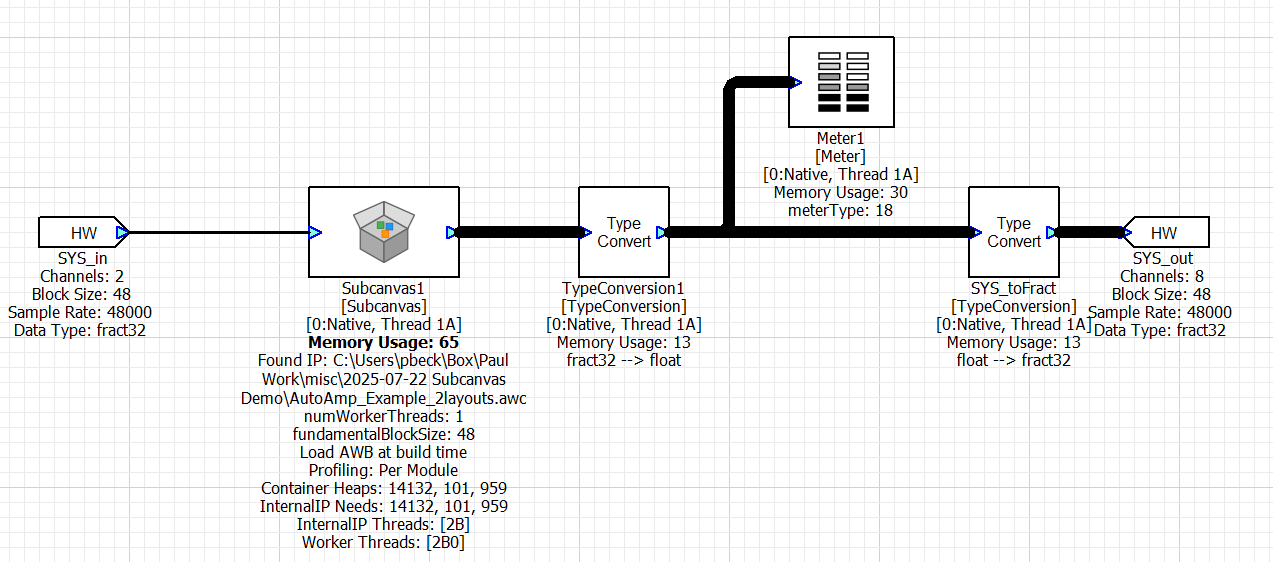
image26
To manually load the Subcanvas, use these Matlab commands:
GSYS = get_gsys;
awc = awe_container('C:\filepath\AutoAmp_Example_2layout.awc')
awc.load_container(GSYS.SYS.Subcanvas1);
If you set the VERBOSE flag to 1, then it will show progress of loading the Subcanvas to the Matlab console. You will see something like:
Sent bundle packet 1
Sent bundle packet 2
Sent bundle packet 3
Sent bundle packet 4
Sent bundle packet 5
Sent bundle packet 6
To unload the contents of the Subcanvas (essentially destroy the internal AWECore instance), use:
GSYS.SYS.Subcanvas1.SC.reset=1;