ALSA IO
Note
This document is currently under active development. Content may be updated, revised, or removed without notice.
This section describes the modules for streaming audio between the High-Level OS (HLOS) and Audio Weaver. AWE-Q Release 4.4.B introduces new ALSA Source and ALSA Sink modules with integrated sample rate converters. The goal is to simplify usage and prevent configuration errors which plagued earlier releases. The 2 main modules to use are:
These modules look and act like hardware pins, but they are implemented as Audio Weaver modules. As modules, they have all of the functionality of a module (module arguments, parameters, inspectors, thread placement, etc.). You should add one ALSA Source module for each ALSA playback device, and one ALSA Sink module for each ALSA capture device. The ALSA I/O modules can be on any of the audio processing cores including Hexagon DSPs and Arm cores.
The ALSA Sink and Source modules have integrated sample rate converters (SRCs). The SRCs allow Audio Weaver to operate at a fixed sample rate while the HLOS can stream audio at any of these standard audio sample rates (in Hz):
| 8000 | 11025 | 12000 |
| 16000 | 22050 | 24000 |
| 32000 | 44100 | 48000 |
| 64000 | 88200 | 96000 |
| 128000 | 176400 | 192000 |
| 256000 | 352800 | 384000 |
Internal Architecture
The ALSA Source and ALSA Sink blocks you place on the canvas are subsystems. When the layout is built, AWE Designer expands each subsystem into the following internal modules:
- An endpoint module:
ALSASource/ALSASink— the basic endpoint, used when no AV-sync timing reference is needed.ALSASourceTS/ALSASinkTS— the time-stamping variant, automatically substituted when thetimingModNameargument is non-empty. The TS variant adds time stamps usable by the HLOS to synchronize audio and video.
- A sample rate converter module (
ALSA Source SRCorALSA Sink SRC) which is also instantiated automatically. - For floating-point pins (
dataType = Float), aTypeConvertmodule is inserted automatically between the SRC and the user pin. TheALSA Sourcehas theTypeConvertmodule at its output pin while theALSA Sinkhas theTypeConvertmodule at its input pin.
You should not need to instantiate the internal endpoint or SRC modules directly — the subsystem wires everything up for you. They are described here for reference because their state variables and inspector controls are reachable through the subsystem. When you profile in Audio Weaver you will see the internal modules in the profiling data. The bulk of the computation is usually due to the sample rate converter.
TinyALSA Integration
Behind the scenes, these modules are implemented as TinyALSA plugins. Data is streamed via shared memory and care was taken to minimize the number of buffer copies. A figure showing the HLOS and Audio Weaver portions of an ALSA Source device are shown below.
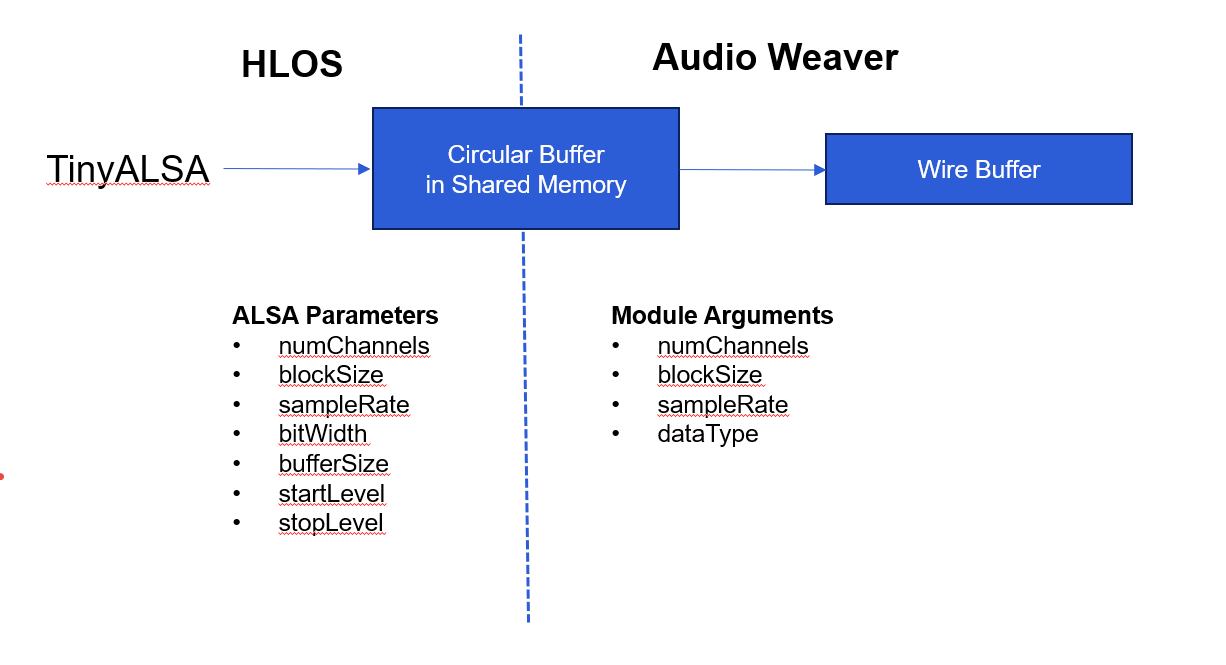
The module in the signal flow is defined using these arguments are used as follows:
numChannels, blockSize, sampleRate, dataType - these are the properties of the output wire buffer.
The HLOS application opens the ALSA playback device based on its deviceName or deviceID. When the device is opened by the HLOS, the application sets these properties:
numChannels - number of channels that the HLOS will stream.
blockSize - number of samples that the HLOS will write per transfer.
sampleRate - sample rate of the data.
bitWidth / format - number of bits per sample. The HLOS selects one of five enumerated sample formats described in Supported Sample Formats. All data is fixed-point with a fractional representation.
bufferSize - size of the circular transfer buffer, in samples. We recommend that the bufferSize is at least 4 x blockSize. Larger buffers reduce underruns but increase latency.
startThreshold - used during device startup. Number of samples that must be in the circular buffer before Audio Weaver starts reading data.
stopThreshold - determines when the PCM stream should automatically stop due to underrun (playback) or overrun (capture). Set by the HLOS at device open and exposed through the inspector for visibility.
These properties are independent of the Audio Weaver arguments. For example, the HLOS can use a blockSize of 480 samples (10 msec) while Audio Weaver uses a blockSize of 48 samples (1 msec). Other mismatches are handled as follows:
If there is a sampleRate mismatch, then if the module is configured to use the SRC, then there is no error. Otherwise, there will be an error when the device is opened.
format / bitWidth mismatch never happens. The HLOS can stream at any of the supported formats and Audio Weaver always converts internally to S32_LE (fract32).
numChannels The number of channels streamed by the HLOS must be equal to or less than the number of channels defined in the module arguments. Unused Audio Weaver channels are zero-filled. If the HLOS tries to stream more channels than supported by the module there will be an error when the ALSA device is opened.
Supported Sample Formats
The HLOS may open an ALSA device using any of the following sample formats. The HLOS-side format is independent of the Audio Weaver wire data type; the SRC / endpoint module converts to S32_LE (fract32) internally before handing data to Audio Weaver.
| Value | Name | Description |
|---|---|---|
| 0 | S16_LE | Signed, 16-bit, little endian. |
| 1 | S32_LE | Signed, 32-bit, little endian. This is the internal AWE format. |
| 2 | S8 | Unsigned, 8-bit. |
| 3 | S24_LE | Signed, 24-bit packed into a 32-bit little-endian word. NOT YET WORKING. DO NOT USE! |
| 4 | S24_3LE | Signed, 24-bit, three packed bytes per sample, little endian. |
The active format is shown on the inspector as Sample Format. Be careful to distinguish S24_LE (one sample per 32-bit word, with 8 bits of padding) from S24_3LE (three bytes per sample on the wire) — the two are not interchangeable on the HLOS side.
Audio data is always streamed as fractional data from the HLOS to Audio Weaver. We do not currently support floating-point WAV files. The processing inside the ALSA modules is all fixed-point and if you request a floating-point output from the ALSA Source module it will insert a TypeConversion module for you automatically.
ALSA Source Module
The module appears as follows on the canvas. It appears as a "pin", but is actually a module.
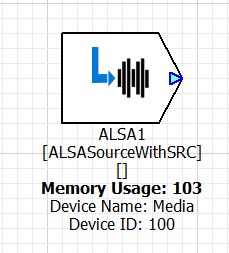
By default, the module has a single output pin which contains the audio from the HLOS. If you set the "outputStreamInfo" argument to true, you will see another pin labeled "SI" on the bottom of the module.
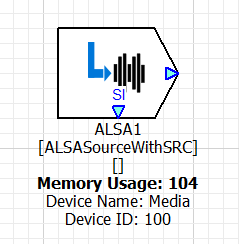
This pin carries stream information which allows you to tell the state of the ALSA device. It outputs an integer-valued control signal on a block-by-block basis and indicates:
| Value | Name | Meaning |
|---|---|---|
| 0 | AWE_ALSA_BOS_IDLE |
Stream is idle. No audio is being streamed. |
| 1 | AWE_ALSA_BOS_BEGINNING |
First block of the stream. |
| 2 | AWE_ALSA_BOS_MIDDLE |
Middle of the stream. |
| 3 | AWE_ALSA_BOS_END |
Last block of the stream (asserted when the HLOS issues drain). |
After the HLOS drains the stream, the SI pin transitions from MIDDLE to END and then back to IDLE on the next block. You can latch on the END value to perform end-of-stream actions in your signal flow.
Module Arguments
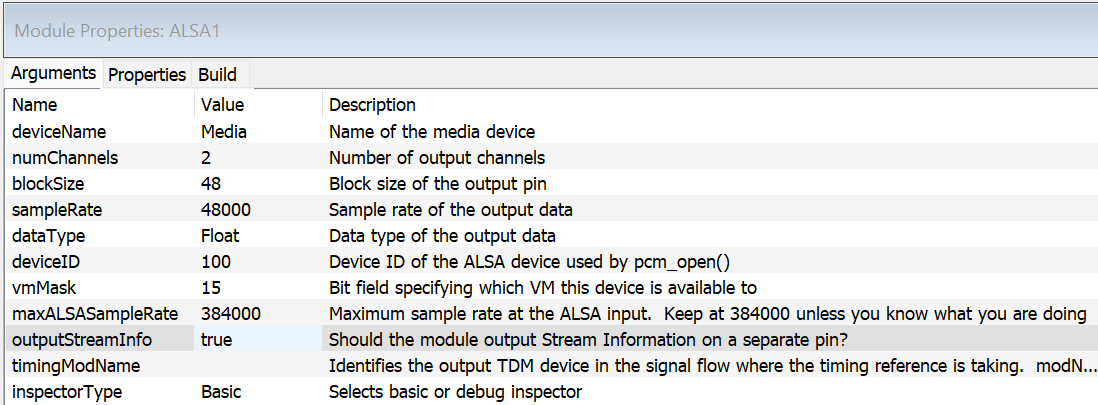
deviceName - string giving a unique identifier to the device. The HLOS can search for devices based on this name. The name is limited to 31 or fewer characters and must be a valid identifier (letters, digits, underscore; not starting with a digit).
{numChannels, blockSize, sampleRate, dataType} - set the output wire properties of the device. As shown above, the device outputs stereo data, every 1 msec, at a sample rate of 48 kHz. dataType is a drop-list selecting between Fract32 (0) and Float (1, the default). When Float is selected, a TypeConvert module is inserted automatically after the SRC.
deviceID - integer ID which is exposed to the HLOS. This is the deviceID passed to the pcm_open() command and is used to find the device. Note, each ALSA device needs to have a unique deviceID and this is checked at build time. This deviceID identifies the ALSA device to tinyplay / tinycap. For example:
tinyplay -D 0 -d deviceID file.wav
vmMask - bit mask which specifies which OS'es the audio device is available in. See vmMask below for the bit assignments. For example, if you have a "safety chimes" device, it should only be available in the PVM, instead of the GVM.
maxALSASampleRate - This specifies the highest sample rate that the ALSA device will ever receive from the HLOS. This setting affects internal memory allocation and by default it is set to 384000 which allocates the worst case (i.e., large buffers). If you know what you are doing and need to save memory, then you can reduce this to a lower sample rate. If this is set incorrectly, you will get distortion at the output of the ALSA module! Allowed values are drawn from the supported sample-rate list above.
outputStreamInfo - Boolean value which causes the Stream Info pin ("SI") to appear on the module. By default, this is false and SI does not appear.
timingModName - String which names a TDM port in the signal flow that will be used as the timing reference for AV sync. When this string is non-empty, the subsystem automatically uses the time-stamping (ALSASourceTS) endpoint variant, which generates time stamps usable by the HLOS to synchronize audio and video. The string uses the format:
modName.pinName[channelIndex]
where modName is the hierarchical name of the TDM port module (forward slash separated), pinName is the pin on that module, and channelIndex is the 1-based channel number. The referenced module must be a SnapdragonSyncTDMPort or SnapdragonAsyncTDMPort; any other class will produce a build error. Leave the string blank if you do not need AV-sync timestamps.
inspectorType - Drop-list selecting between the Basic inspector (the default, value 0) and the Full_Debug inspector (value 1) which exposes additional SRC controls.
The circular buffer in shared memory is not allocated by Audio Weaver, but by the TinyALSA plug-in when the audio device is opened by the HLOS. This memory is allocated outside of the Audio Weaver heaps and you will not see this memory in the Audio Weaver profiling.
Basic Module Inspector
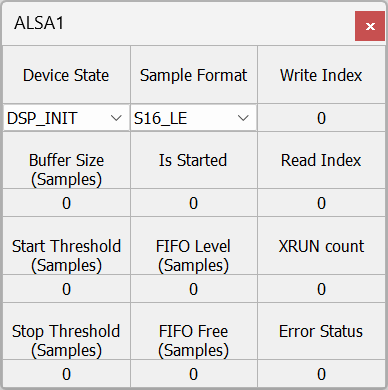
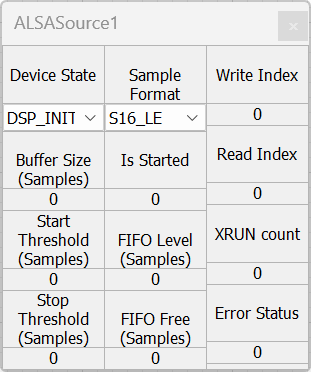
The inspector is used for viewing the state of the module. There are no user settable parameters here.
{Sample Format, Buffer Size, Start Threshold, Stop Threshold} - Parameters set when the playback device is opened by the HLOS.
Device State - The device transitions through the following states as the HLOS opens, starts, stops, and closes the device:
| Value | Name | Meaning |
|---|---|---|
| 1 | DSP_INIT |
Audio Weaver has finished initializing the device but it has not yet been opened by the HLOS. |
| 2 | HLOS_INIT |
The HLOS has opened the device; the DSP is finalizing the shared-memory pointer translation. This state is normally transient and rarely visible on the inspector. |
| 3 | STOPPED |
The HLOS has opened the device but is not streaming data. |
| 4 | STARTED |
The HLOS has opened the device and is streaming data. |
In addition, an internal DROPPED state is used briefly when the HLOS closes the device; the module auto-transitions back to STOPPED and you should not normally observe it.
Note
The basic source endpoint exposes Device State as a plain integer, while the timestamping (TS) endpoint maps it through a drop-list with the names above. Older documentation referred to only three states (DSP_INIT=1, STOPPED=2, STARTED=3); the four-state numbering above is the current behavior.
Is Started - Boolean which indicates whether the HLOS is streaming audio data.
FIFO Level - Number of samples in the circular transfer buffer that can be read by Audio Weaver. If this goes to zero, then an underrun occurs.
FIFO Free - Number of samples that can be written into the transfer buffer by the HLOS. If this goes to zero, then an overrun occurs.
{Write Index, Read Index} - pointer offsets when accessing the circular buffers.
XRUN Count - Number of overruns or underruns that have occurred. The ALSA Source device can only have underruns.
Error Status - Internal API error status. Should be 0 during normal operation.
Full Debug Inspector
If you select the "Full_Debug" inspector on the Module Arguments, the basic controls are augmented with additional read-back fields exposed by the internal SRC module. These are useful when investigating SRC issues:
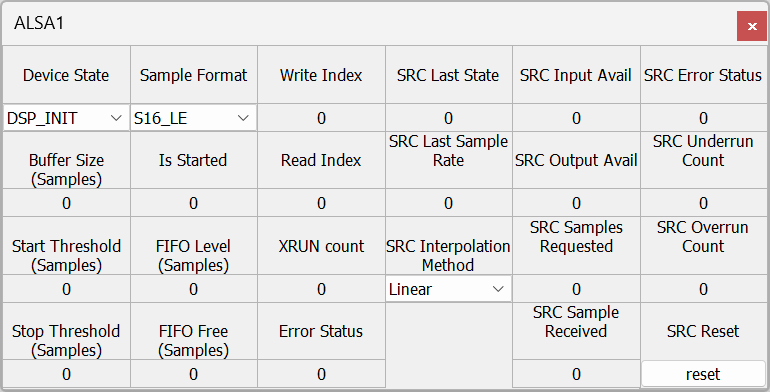
SRC Last State - Read back. Indicates whether the device is active or not.
SRC Last Sample Rate - Read back. Sample rate of the data supplied by the ALSA device.
SRC Interpolation Method - User settable. Specifies whether the device implements Linear or Cubic interpolation. More details are provided below.
SRC Input Avail - Read back. Number of samples at the ALSA sample rate that can be written into the SRC's jitter buffer.
SRC Output Avail - Read back. Number of samples at the Audio Weaver sample rate that can be read from the SRC based on the level of the jitter buffer.
SRC Samples Requested - Read back. Number of samples requested from the ALSA Source device. These are to be sent during the next pump cycle.
SRC Samples Received - Read back. Number of samples that were actually received from the ALSA Source device.
SRC Error Status - Read back. API error status. Should be 0 during normal operation. See Section TBD for how to interpret this value.
SRC Underrun Count - Read back. Number of underruns when attempting to read data out of the SRC. If you get underruns, then the HLOS is not writing data fast enough.
SRC Overrun Count - Read back. Number of overruns. An overrun indicates that the jitter buffer in the SRC is full. This should never happen for ALSA Source devices.
SRC Reset - User settable. Click "reset" to set the errorStatus and all counters back to zero.
SRC Performance
The SRC algorithm uses linear phase filters and the CPU load depends upon the number of channels, sample rates, and whether linear or cubic interpolation is selected. See the section on "Performance Benchmarks" for detailed cycle counts.
When the input sample rates equals the output sample rate, then the SRC is not used and data is simply copied from input to output. This preserves full 32-bit precision with fract32 data. When the SRC is engaged, there will be -1 dB of attenuation applied to prevent saturation of the fract32 fixed-point math.
The SRC is designed so that a 1 kHz input sine wave will have distortion at least 80 dB down. Cubic interpolation has better performance - especially for high frequencies - than linear interpolation. Cubic interpolation also takes more MHz when running.
The interpolation algorithm utilizes FIR low pass filters. The interpolating filters have a flat frequency response up to 0.75 Nyquist. For example, if you are converting from 44.1 to 48 kHz, then frequency response will be flat to approximately 18 kHz.
Linear and Cubic Interpolation Modes
Linear interpolation uses less CPU resources and provides slightly higher THD, especially at high frequencies.
ALSA Sink Module
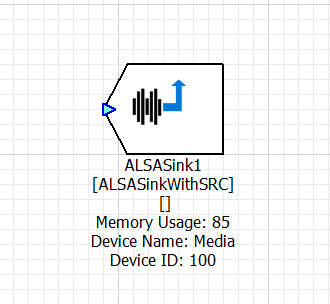
The ALSA Sink module streams audio from Audio Weaver to the HLOS. It is structurally similar to the ALSA Source module — same subsystem pattern, same integrated SRC, same internal endpoint/TS-endpoint substitution — but with two differences worth calling out:
- The Sink has an input pin (audio flowing from Audio Weaver into the HLOS) instead of an output pin.
- The Sink does not expose an
outputStreamInfoargument or "SI" pin. Stream state is observable only via the inspector and internal variables.
Module Arguments
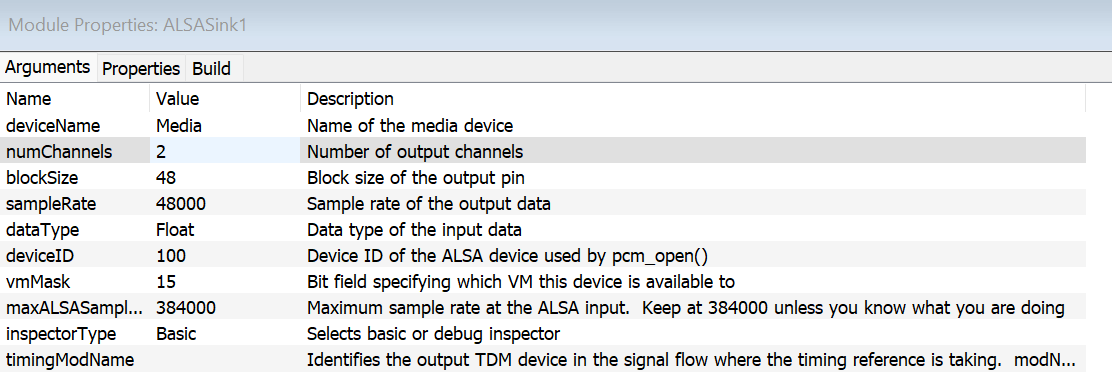
The arguments are the same as the ALSA Source module with the exception noted above:
numChannels, blockSize, sampleRate, dataType - Set the input wire properties of the device. dataType selects between Fract32 (0) and Float (1, the default). When Float is selected, a TypeConvert module is inserted automatically before the SRC.
deviceName, deviceID, vmMask, maxALSASampleRate - Same meaning as the ALSA Source module.
inspectorType - Drop-list: Basic (0) or Full_Debug (1).
timingModName - Same string format as the source: modName.pinName[channelIndex]. As with the source, only SnapdragonSyncTDMPort and SnapdragonAsyncTDMPort are accepted; for the sink, the referenced TDM port must be a source direction device (the build will fail otherwise). Setting this argument switches the internal endpoint to the time-stamping variant (ALSASinkTS).
There is no outputStreamInfo argument for the sink — the sink does not produce a Stream Info pin.
Module Inspector
The inspector is identical to the ALSA Source module's inspector, with the same Basic and Full_Debug variants. The fields and their meanings are the same; refer to the ALSA Source inspector documentation above. The sink only reports overruns rather than underruns — the XRUN Count counts overruns, since the Sink writes into the transfer buffer and the HLOS reads from it.
ALSA Tips and Tricks
Using Internal Variables
The ALSA modules expose a number of internal variables through their endpoint sub-module. You can use ParamGet modules to read these and put them onto control wires for use elsewhere in the signal flow. The most useful are:
| Variable | Type | Inspector label | Description |
|---|---|---|---|
deviceState |
int32_t | Device State | 1=DSP_INIT, 2=HLOS_INIT, 3=STOPPED, 4=STARTED (see device state table above). |
isStreaming |
int32_t | Is Started | Non-zero when audio data is actively streaming. |
numSamples |
int32_t | FIFO Level | Samples currently in the circular transfer buffer. |
freeSpace |
int32_t | FIFO Free | Free space in the circular transfer buffer. |
xrunCount |
int32_t | XRUN count | Underrun count (source) or overrun count (sink). |
errStatus |
int32_t | Error Status | Internal API error status; 0 in normal operation. |
bufferSize |
int32_t | Buffer Size | Circular buffer size set by the HLOS at device open. |
startThreshold |
int32_t | Start Threshold | Number of samples required in the buffer before streaming starts. |
stopThreshold |
int32_t | Stop Threshold | TBD. |
format |
int32_t | Sample Format | HLOS sample format enum (see Supported Sample Formats). |
writeIndex |
int32_t | Write Index | Producer offset in the circular buffer. |
readIndex |
int32_t | Read Index | Consumer offset in the circular buffer. |
Because the user-facing ALSASourceWithSRC / ALSASinkWithSRC block is a subsystem, you address these variables through the internal endpoint, e.g. MyAlsa.Source.isStreaming or MyAlsa.Sink.deviceState, where Source / Sink is the fixed internal endpoint name.
ALSA Troubleshooting
This section describes how to properly configure the ALSA devices to prevent audio dropouts. If you get dropouts, then this is because the client HLOS applications are not writing or reading data fast enough. Different techniques are needed for ALSA Source and ALSA Sink modules.
ALSA Source Underruns
Suppose that the HLOS opens the device with a 5 msec block size and a total buffer size of 10 msec (by specifying 2 blocks when opening the device), and that Audio Weaver is configured to read data every 1 msec (The discussion here is based on block times which are easier to follow. The actual configuration is based on block sizes.) (We are ignoring asynchronous devices here, but the same explanation holds.) The ALSA Source module will output zeros after the device has been opened and the HLOS has not yet written data. This does not count as an underrun. The HLOS writes the first 5 msec block of data. The ALSA Source module sees the new data and then starts streaming data. It reads data out of the circular transfer buffer 1 msec at a time. The HLOS needs to write the next block of data within 5 msec or an underflow will occur.
Sometimes the HLOS needs more time to write data. This is where the startThreshold of the ALSA device comes into play. Suppose that the HLOS application opens the ALSA device with a buffer size of 40 msec and a startThreshold of 20 msec. The HLOS application then writes 4 blocks of data. The circular transfer buffer now holds 20 msec of data and the startThreshold has been crossed. At this point, the ALSA Source module stops writing zeros and starts streaming data. Since there is 20 msec of data (the startThreshold) in the buffer, the HLOS has more time to refill and write the next block.
Of course, the startThreshold increases the latency, but often this is needed to eliminate underruns. These are recommended minimum settings for ALSA Source devices used with Linux and Android operating systems:
blockSize 10 msec
bufferSize 40 msec (4 x blockSize)
startThreshold 20 msec (2 blockSize)
stopThreshold not important
QNX is more deterministic, which allows you to reduce the block size and reduce latency:
blockSize 5 msec
bufferSize 20 msec (4 x blockSize)
startThreshold 10 msec (2 blockSize)
stopThreshold not important
ALSA Sink Overruns
In a similar fashion, it is possible to get overruns if the HLOS does not read data quickly enough from the ALSA Sink device. To solve this problem, you have to increase the ALSA buffer size, and thereby increase the size of the circular transfer buffer. Adjusting the startThreshold and stopThreshold does not help.
Sample Rate Conversion Overhead
The ALSA Source and Sink SRC modules only do sample rate conversion if there is a mismatch between the ALSA sample rate and the Audio Weaver sample rate. In Release 4.4.C, the cost of 44.1 to 48 kHz sample rate conversion is 52.2 MHz for 16 channels. The cost increases linearly with the output sample rate. For example, converting 44.1 to 96 kHz consumes 91.8 MHz.
vmMask
This is a module argument to the ALSA Source and Sink devices. It is an integer value which specifies which operating system the ALSA device is mapped to. (Although named "mask", it does not function as a bit mask.) vmMask=0 indicates that the ALSA device is mapped to the PVM. vmMask=1 indicates that the ALSA device is mapped to the GVM.
Timestamps
The ALSA implementation in AWE-Q returns timestamp information to HLOS applications allowing them to synchronize audio and video streams. The ALSA Source and Sink module have an argument that allows you to specify another module (and pin) as the timing reference. For example, with an ALSA Source module, you typically using a TDM output module (the one connected to the playback loudspeakers) as the timing reference. Audio Weaver computes the processing delay (the algorithmic delay) from the ALSA device to the TDM output and uses this when computing timestamps.
Refer to the Audio Weaver feature Accumulated Delay which tracks latency through the signal flow for more information.
ALSA Source Sample Rate Conversion Module (Used Internally)
Note
This section describes an internal module that you do not normally instantiate yourself. The user-facing ALSA Source block is a subsystem that wires this module up for you. Refer to this section if you are debugging an SRC issue or need to understand the timing-information (TI) feedback wires.
If you need Audio Weaver to do sample rate conversion of ALSA streams, set the "isSRC" module argument to true on the internal endpoint. This will add two more pins to the ALSA Source module which are used to exchange timing information. These pins are used in conjunction with the ALSA Source Sample Rate Converter module as shown below:
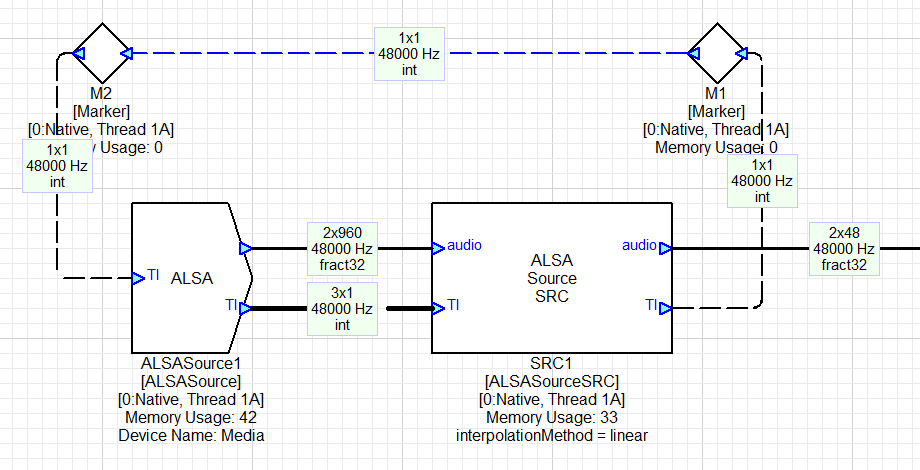
In this example, the ALSA Source SRC module is configured to output a block size of 48 samples at 48 kHz. The ALSA Source SRC module contains the DSP Concepts' ASRC library which was described in Section TBD. The ALSA Source SRC module "pulls" data from the ALSA device and writes it into the ASRC's jitter buffer. It pulls enough data to generate 48 samples during the next pump cycle. The ALSA Source SRC module communicates how many samples are required during the next pump cycle by the integer value in its TI output pin. For example, if the sample rate of the ALSA stream is 44.1 kHz, then the ALSA Source SRC would request 44 or 45 samples in order to generate 48 output samples at 48 kHz.
The ALSA Source module shown above has an output block size of 960 samples. 960 samples are not transferred every time, only as many samples requested by the ALSA Source SRC (This is how varying sample rates are handled in Audio Weaver. The buffers are oversized for the worst case transfer size and side information - in the timing information pins - is used to regulate the flow).
You should configure this to be large enough to support any data request by the ALSA Source SRC. Suppose that the HLOS needs to stream data at 384 kHz. 1 msec of data now equals 384 samples and the wire size should be oversized to allow the ALSA Source SRC to prefill data. We recommend sizing the output block size of the ALSASource module at 2 times the largest block size that is expected. In this case, you set it at 768 samples. This sizing must take into account the output block size of the ALSA Source SRC module. Suppose it is outputting 10 msec of data instead of 1 msec, then the input buffer should be sized at 7680 samples. There is no harm (except in wasted memory) in oversizing ALSA Source module's output wire.
The wire that connects the output of the ALSA Source SRC's TI pin with the TI input of the ALSA Source module is a feedback wire. You'll see that this wire is drawn in blue in the figure above. You need to manually configure this wire in Audio Weaver (the subsystem prebuild does this automatically when the SRC is wired by the canonical subsystem). Right click on the wire, and select "Edit Feedback Properties". Configure the wire as shown below:
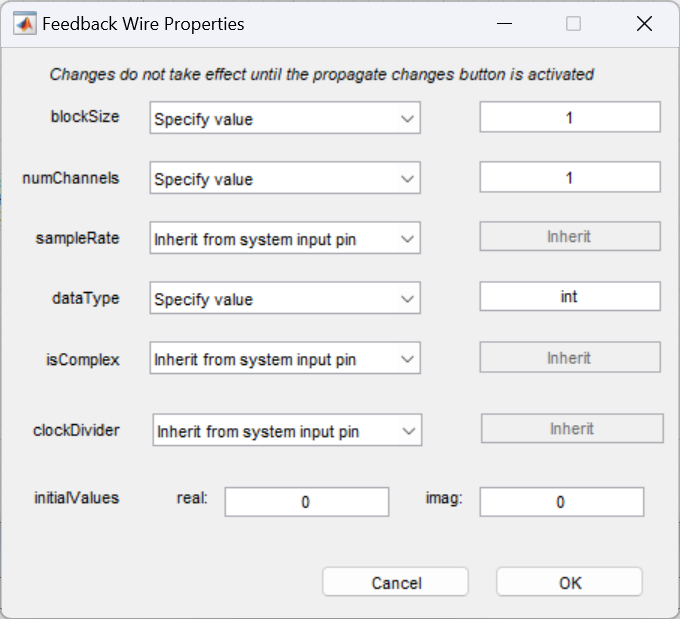
The Timing Information wire between the ALSA Source module and the ALSA Source SRC module contains 3 integer values. You typically don't have to look at these, but the curious person may want to know:
Wire[0] - isStarted. Boolean
Wire[1] - ALSA sample rate.
Wire[2] - Number of samples written to the output wire. This is usually the number of samples requested by the ALSA Source SRC, but can be smaller if there is insufficient data in the ALSA device's circular buffer.
If the ALSA device has not started streaming, then all 3 values will be zero.
ALSA Source SRC Module Arguments
The module arguments configure the output wire properties in Audio Weaver.
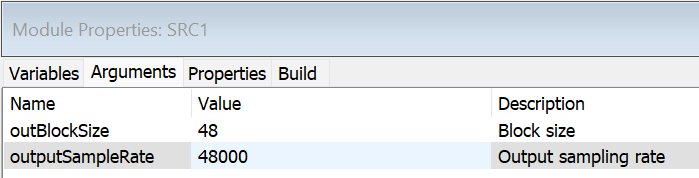
The number of channels is not specified but is instead inherited from the ALSA Source module.
ALSA Source SRC Inspector
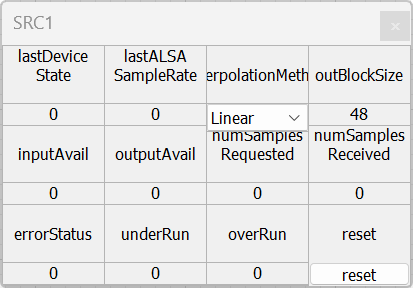
The Source SRC inspector exposes the following read-back values and one user-settable control:
lastDeviceState - Read back. Indicates whether the device is active or not.
lastALSASampleRate - Read back. Sample rate of the data supplied by the ALSA device.
interpolationMethod - User settable. Specifies whether the device implements Linear or Cubic interpolation. Currently, this does nothing and only linear interpolation is used.
outBlockSize - Read back. Output block size of the Audio Weaver. This should equal the constructor argument outBlockSize.
inputAvail - Read back. Number of samples at the ALSA sample rate that can be written into the ASRC's jitter buffer.
outputAvail - Read back. Number of samples at the Audio Weaver sample rate that can be read from the ASRC based on the level of the jitter buffer.
numSamplesRequested - Read back. Number of samples requested from the ALSA Source device. These are to be sent during the next pump cycle.
numSamplesReceived - Read back. Number of samples that were actually received from the ALSA Source device.
errorStatus - Read back. API error status. Should be 0 during normal operation. See Section TBD for how to interpret this value.
underRun - Read back. Number of underruns when attempting to read data out of the ASRC. If you get underruns, then the HLOS is not writing data fast enough.
overRun - Read back. Number of overruns. An overrun indicates that the jitter buffer in the ASRC is full. This should never happen for ALSA Source devices.
reset - User settable. Click "reset" to set the errorStatus and all counters back to zero.
Note
When the SRC inspector is reached via the user-facing subsystem's Full_Debug view, the same controls are exposed but the labels are prefixed with "SRC " (e.g. "SRC Last State", "SRC Last Sample Rate") rather than the camelCase variable names listed here. The underlying variables are the same.
ALSA Sink Sample Rate Conversion Module (Used Internally)
Note
This section describes an internal module that you do not normally instantiate yourself. The user-facing ALSA Sink block is a subsystem that wires this module up for you.
If you need Audio Weaver to do sample rate conversion of ALSA streams, set the "isASRC" module argument to true on the internal endpoint. This will add two more pins to the ALSA Sink module which are used to exchange timing information. These pins are used in conjunction with the ALSA Sink Sample Rate Converter module as shown below:
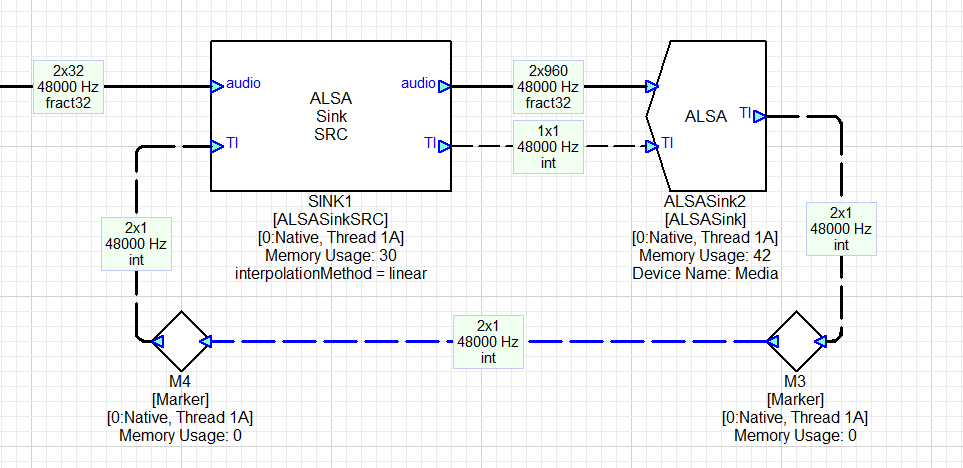
In this configuration, the feedback wire from the ALSA Sink module to the ALSA Sink SRC now contains 2 elements:
Wire[0] - isStarted. Boolean
Wire[1] - ALSA sample rate.
If the ALSA device has not started streaming, then both values will be zero.
ALSA Sink SRC Module Arguments
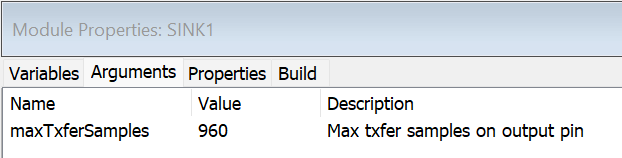
This argument specifies the block size at the output of the ALSA Sink SRC module and should be sized based on the highest sample rate that the ALSA Sink module will output.
ALSA Sink SRC Inspector
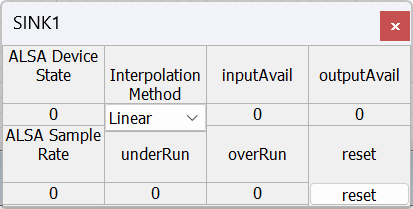
ALSA Device State - Read back. Indicates whether the device is active or not.
ALSA Sample Rate - Read back. Sample rate of the ALSA stream; configures the output sample rate of the ASRC algorithm. This information is communicated via the 2-element timing information (TI) pin.
InterpolationMethod - User settable. Specifies whether the device implements Linear or Cubic interpolation. Currently, this does nothing and only linear interpolation is used.
inputAvail - Read back. Number of samples at the ALSA sample rate that can be written into the ASRC's jitter buffer.
outputAvail - Read back. Number of samples at the Audio Weaver sample rate that can be read from the ASRC based on the level of the jitter buffer.
underRun - Read back. Number of underruns when attempting to read data out of the ASRC. If you get underruns, then the HLOS is not writing data fast enough.
overRun - Read back. Number of overruns. An overrun indicates that the jitter buffer in the ASRC is full.
reset - User settable. Click "reset" to set the errorStatus and all counters back to zero.