Logging in AWE
Audio Weaver generates several log files that capture communication between its components. These logs are useful for diagnosing connection issues, tracing command sequences, and debugging integration problems.
Architecture Overview
The diagram below shows which log files correspond to each communication channel between AWE components:
┌─────────────────┐                        ┌──────────────────────────┐
│   Matlab / MCR  │──── port: 15001 ───────▶│                          │
│                 │◀───────────────────────│      AWE Server          │──── packet.log ────▶ [ AWE Core / Target ]
│  notify.log     │                        │                          │
│  command.log    │                        │  matlab_command.log      │
└────────┬────────┘                        │  server_command.log      │
         │ port: 14001                     │  event_logging.txt       │
         ▼                                 │  awecore_logging.txt     │
┌─────────────────┐                        └──────────────┬───────────┘
│ AWE Designer GUI│◀──────────── awe_server.log ──────────┘
└─────────────────┘

Optional User Tools (e.g. Python scripts):
  Tool A ◀── port: 15007 ──▶ server2_command.log
  Tool B ◀── port: 15009 ──▶ server3_command.log
  Tool C ◀── port: 15011 ──▶ server4_command.log
Log File Reference
| Log Name | Description | Current Session Log | Archived Logs | awe_server.ini key |
|---|---|---|---|---|
matlab_command.log |
Text-based ("AWS") commands/replies between Matlab and AWE Server. Commands from Matlab are RX; replies to Matlab are TX. |
Bin\win32-vc100-rel\logs\matlab_command.log |
Bin\win32-vc100-rel\logs\<date>\<date>_matlab_command.log |
[Logging]Enable=1MatlabLog=1 |
packet.log |
Binary ("AWB") packets/replies between AWE Server and AWE Core. Packets can be sent over USB, UART, TCP/IP, or SPI. | Bin\win32-vc100-rel\logs\packet.log |
Bin\win32-vc100-rel\logs\<date>\<date>_packet.log |
[Logging]Enable=1PacketLog=1 |
awe_server.log |
Connection between Designer GUI and AWE Server for real-time streaming of inspector data (e.g. updating meters and sinks). Only created when the connection is active. Shares the same socket as server_command.log. |
Bin\Assets\logs\aweserver.log |
Bin\Assets\logs\<date>\<date>_aweserver.log |
[Logging]Enable=1 |
server_command.log |
Direct connection between Designer GUI and AWE Server, logged from AWE Server's perspective. Captures similar data as awe_server.log but with some items filtered out. Only created when the connection is active. Shares the same socket as awe_server.log. |
Bin\win32-vc100-rel\logs\server_command.log |
Bin\win32-vc100-rel\logs\<date>\<date>_server_command.log |
[Logging]Enable=1CommandLog=1 |
server_command2.logserver_command3.logserver_command4.log(optional) |
AWE Server allows external applications (e.g. a Python script) to send text-based ("AWS") tuning commands to AWE Core via TCP/IP ports 15007, 15009, and 15011. Only created when the connections are active. | Bin\win32-vc100-rel\logs\server<N>_command.log |
Bin\win32-vc100-rel\logs\<date>\<date>_server<N>_command.log |
[Logging]Enable=1Server2Log=1Server3Log=1Server4Log=1 |
Example Log Entries
matlab_command.log
2018/10/30  15:45:53.734  RX  0:audio_pump,"bell.wav"
2018/10/30  15:45:54.365  TX  0:success,48000
packet.log
2018/10/30  12:18:20.011  TX  00020019  00020019
2018/10/30  12:18:20.011  RX  000c0000  00000000  00000001  beef0001
awe_server.log
2018/10/31  11:20:37.855  TX  0,poll_get_value,Meter1.value[0]
2018/10/31  11:20:37.855  RX  success,38925,float,0.0494126565754
server_command.log
2018/10/31  11:35:05.034  RX  0:connect,localhost,15003
2018/10/31  11:35:05.034  TX  0:success,localhost,15003
Internal Logs
Note
The following logs capture internal exchanges between AWE Designer components during normal operation. They are typically only useful to DSP Concepts developers doing feature development and bug fixing.
| Log Name | Description | Current Session Log | Archived Logs | awe_server.ini key |
|---|---|---|---|---|
command.log |
Commands sent from Matlab to Designer GUI. Response is success/failure and/or returned values on queries. Commands from Designer GUI are RX; replies from Matlab are TX. |
Bin\Assets\log\command.log |
Bin\Assets\log\<date>\<date>_command.log |
[Logging]Enable=1 |
notify.log (Internal) |
Internal notification events sent from Designer GUI to Matlab (e.g. menu clicks). These commands do not expect a response. Shares the same socket as command.log. |
Bin\Assets\log\notify.log |
Bin\Assets\log\<date>\<date>_notify.log |
[Logging]Enable=1 |
Example Log Entries
command.log — no query:
2018/10/16  10:06:46.539  RX  DestroyInspector,1,ProgressBar
2018/10/16  10:06:46.547  TX  success
command.log — with query:
2018/10/16  09:37:27.326  RX  GetCanvasSize,2,Top
2018/10/16  09:37:27.326  TX  success,2,1,70,95
notify.log:
2018/10/30 15:38:35.280 OnClickCanvas,1,Top,37,23
Native AWE Core Logging
AWE Server supports structured logging from the AWE Core runtime on the Native target. These logs appear both in the AWE Server Messages tab and in log files under Bin\win32-vc142-rel\logs\. Logging can be enabled and disabled from AWE_Server-> Preferences, and additional settings are available in the [Logging] section of AWE_Server.ini.
AWE Core Message Log
The AweMsgLoggingEnable key enables logging of internal AWE Core messages. This log replaces the older awelog.txt and captures a broader range of runtime events.
awe_server.ini key |
Default | Description |
|---|---|---|
AweMsgLoggingEnable |
0 |
Enable AWE Core message logging. Output goes to logs/awecore_logging.txt and the AWE Server Messages tab. |
AwecoreLoggingLevel |
3 (INFO) |
Minimum severity level to log (see table below). |
AwecoreLoggingType |
-1 (all) |
Bitmask controlling which message categories are logged (see table below). |
Log Levels
| Value | Macro | Description |
|---|---|---|
0 |
AWE_LOG_LEVEL_NONE |
No logging |
1 |
AWE_LOG_LEVEL_ERROR |
Errors only |
2 |
AWE_LOG_LEVEL_WARNING |
Warnings and errors |
3 |
AWE_LOG_LEVEL_INFO |
Informational messages, warnings, and errors (default) |
4 |
AWE_LOG_LEVEL_DEBUG |
All messages including debug output |
Log Type Mask
AwecoreLoggingType is a bitmask. Set it to -1 to accept all message types, or sum specific values to include only those categories. To exclude categories, subtract their values from -1 (e.g. to suppress module get/set access logs: -1 - 512 - 1024 = -1537).
| Bit value | Macro | Description |
|---|---|---|
1 |
AWE_LOG_DATA_DUMP |
Raw data dumps |
2 |
AWE_LOG_SYSTEM_MSG |
General system messages |
4 |
AWE_LOG_PACKET_PROCESSING_MSG |
Packet processing activity |
8 |
AWE_LOG_AWB_LOADING_MSG |
AWB file loading events |
16 |
AWE_LOG_CPU_OVERFLOW_MSG |
CPU overflow warnings |
32 |
AWE_LOG_FRAMEWORK_MSG |
Framework-level messages |
64 |
AWE_LOG_HEAP_MSG |
Heap allocation messages |
128 |
AWE_LOG_MODULE_MSG |
Module-level messages |
256 |
AWE_LOG_INSTANCE_CRASH_STAT |
Instance crash statistics |
512 |
AWE_LOG_MODULE_ACCESS_SET |
Module parameter set operations |
1024 |
AWE_LOG_MODULE_ACCESS_GET |
Module parameter get operations |
-1 |
AWE_LOG_ALL_TYPE_MASK |
All categories (default) |
AWE Core Event Log
The Event module can emit typed payloads (strings, integers, floats, etc.) at runtime. When AwecoreEventLoggingEnable is set, these are captured in logs/event_logging.txt and shown in the AWE Server Messages tab. A message is generated for each event registration, deregistration, and trigger.
awe_server.ini key |
Default | Description |
|---|---|---|
AwecoreEventLoggingEnable |
0 |
Enable Event module logging. Output goes to logs/event_logging.txt and the AWE Server Messages tab. |
The following eventType values receive special handling on the Native target — their payloads are interpreted and logged as the corresponding type. Note that these unique eventTypes are handled only on the Native target and have no special meaning on other targets.
eventType |
Type |
|---|---|
10 |
String |
11 |
Signed integer |
12 |
Unsigned integer |
13 |
Float |
14 |
Hex |
Messages Tab Limit
ServerMaxLogMessages controls how many log entries are retained in the AWE Server Messages tab (default: 100). Increasing this value is useful when diagnosing startup sequences or high-frequency events.
Logging Options Menu
Non-native targets can also support AWE Core logging. The currently connected target's log settings (log level and log type mask) can be changed from the Tools -> Logging Options menu in Designer. This control can help increase log levels while debugging on the target without having to recompile the BSP code.
Upon opening the menu, the targets current logging settings are shown as the default values. Changing Log Level or Log Type Mask will apply immediately to the selected Instance.
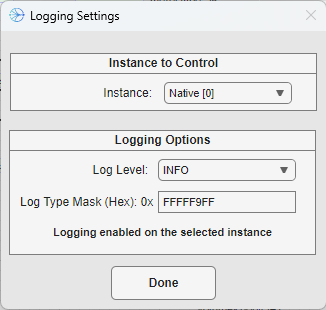
Be aware that changes made with this menu are not persistent - if the target is restarted, the default log options for the system are reapplied. This goes for the Native target as well - if AWE_Server is restarted, then the log settings from AWE_Server.ini are applied.