Power Modes
AWE-Q supports two low power modes for the audio subsystem. Both stop audio processing and reduce power consumption while the vehicle is parked or the system is otherwise idle, but they differ in how much is preserved on the audio cores and, as a result, in how much work the application must do to bring audio back.
| Suspend to RAM (STR) / Resume | Deep Sleep / Quick Boot | |
|---|---|---|
| Power consumption | Low | Lowest |
| DSP firmware | Stays loaded | Reloaded on wake up |
| Layout (AWB) | Stays loaded | Reloaded on wake up |
| Parameter values (volume, EQ, fader, ...) | Preserved | Lost – application must restore them |
| Module internal state (delay lines, filter history, ...) | Cleared by ResetState() |
Cleared (memory is wiped) |
| Audio cores | Clock stopped, memory retained | Processor disabled, memory cleared |
ResetState() called on modules |
Yes | No |
| ALSA devices | Must be stopped before suspending | Must be closed before sleeping – they disappear |
| Wake-up time | Fastest – just restart audio | Longer – similar to a fresh boot |
| Resume command | audio_start |
Reload firmware, reload layout, restore settings, audio_start |
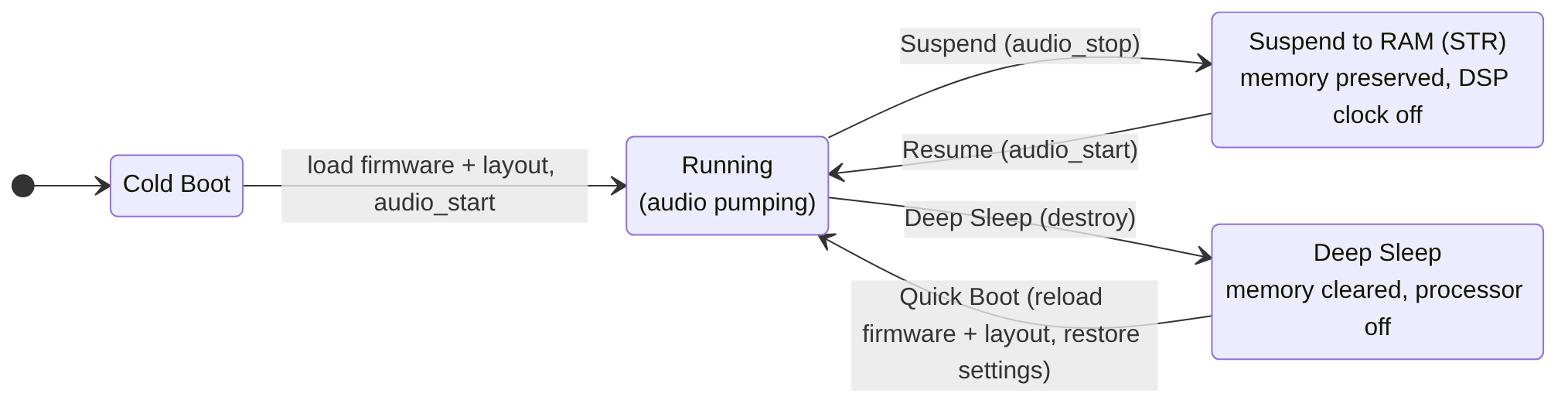 Figure 1. The AWE-Q power states and the transitions between them.
The power mode transitions are initiated by the application (the AWE Controller) through the AWE Manager. On the audio cores, AWE-Q performs the same steps on every Hexagon DSP and on the Arm core. See the AWE Manager Shell page for the audio_stop, audio_start, load_design and unload_design commands used in the examples below.
Suspend to RAM (STR) / Resume
Suspend to RAM is the lighter of the two modes. Audio processing halts and the DSP clock is turned off, but everything stays in memory: the DSP firmware, the signal flow, and all of the parameter values. Resuming is therefore very fast and the system picks up exactly where it left off.
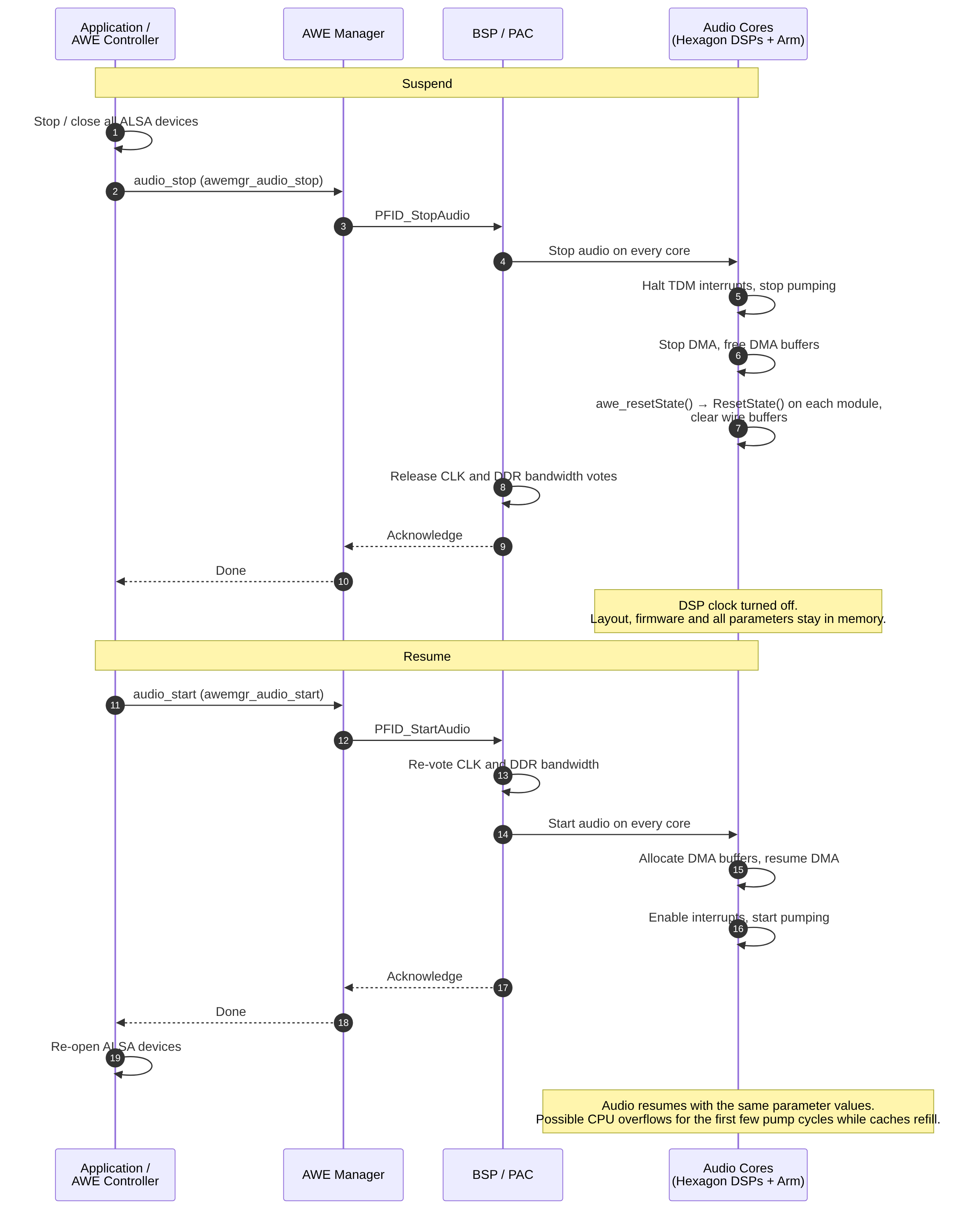 Figure 2. Suspend and Resume sequence.
What happens on Suspend
Before suspending, the application must stop all ALSA devices. Then it sends the audio_stop command (awemgr_audio_stop() in the AWE Manager API). The AWE Manager forwards the request to the BSP as PFID_StopAudio, which is delivered to the primary audio core (PAC) and from there to every audio core. On each core:
- Audio (TDM) interrupts are halted and the audio clocks are stopped. Pumping stops.
- DMA is turned off and the DMA buffers are deallocated.
- The framework calls
awe_resetState(). This calls theResetState()function of every module that defines one, and clears all wire buffers. This prevents stale audio in delay lines and filter histories from producing pops and clicks when audio resumes. See Module ResetState Function below. - The clock and DDR bandwidth votes are released, allowing the DSP clock to be turned off.
- The BSP acknowledges
PFID_StopAudioand the AWE Manager returns to the application.
While suspended, all memory is preserved: the layout is still loaded and all parameter values (volume, fader, balance, tone controls, etc.) are untouched. get_value and set_value can still be used while in this state; they return without error.
What happens on Resume
The application sends the audio_start command (awemgr_audio_start()). The AWE Manager forwards PFID_StartAudio to the BSP, which on each core:
- Re-votes the clock and DDR bandwidth (this comes from the BSP configuration, not from a module).
- Allocates the DMA buffers and resumes DMA.
- Enables the audio interrupts.
- Starts pumping. Real-time processing resumes on all Hexagon DSPs and on the Arm core.
- Acknowledges
PFID_StartAudioand the AWE Manager returns to the application.
The application can then re-open its ALSA devices. There is no need to reload the layout or the DSP firmware, and no need to restore any user settings – everything resumes with the same values it had before the suspend.
Note: It is possible to see CPU overflows during the first few pump cycles after a resume while the caches are refilled. These are transient and clear on their own.
Example
Using the AWE Manager Shell:
awemgr-shell> audio_stop
...
awemgr-shell> audio_start
In application code the equivalent calls are awemgr_audio_stop() and awemgr_audio_start().
Deep Sleep / Quick Boot
Deep Sleep is the lowest power mode. The audio processors are disabled entirely and their memory is cleared, so nothing from the running system survives. Waking up ("Quick Boot") is similar to a fresh boot of the audio subsystem.
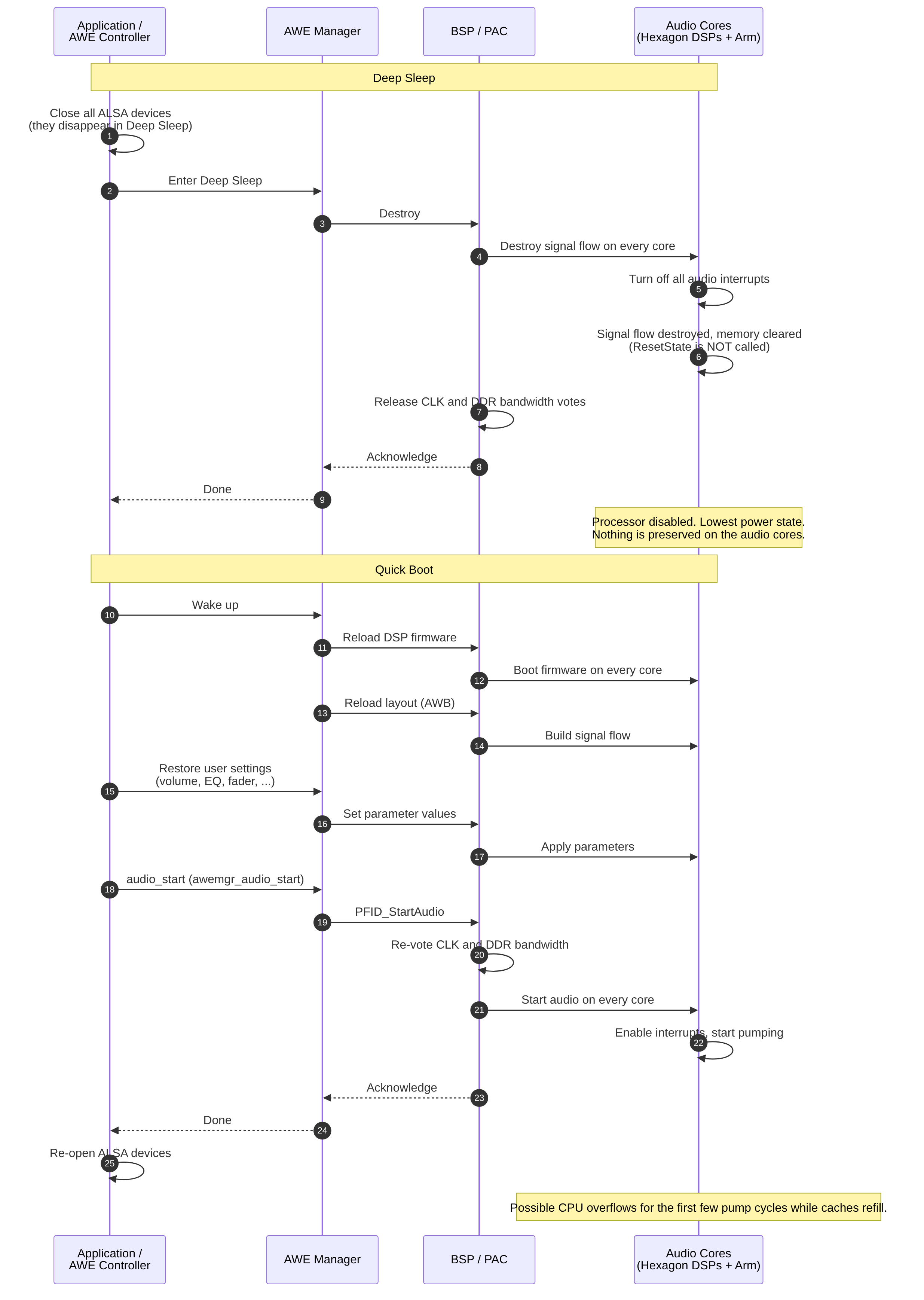 Figure 3. Deep Sleep and Quick Boot sequence.
What happens on Deep Sleep
Before entering Deep Sleep, the application must close all ALSA devices – they disappear while the system is in Deep Sleep. Then the signal flow is destroyed (for example with unload_design) and the audio subsystem is powered down:
- All audio interrupts are turned off.
- The signal flow is destroyed and memory is cleared.
- The processor is disabled.
The ResetState() functions of the modules are not called when entering Deep Sleep; since the memory is cleared there is nothing to reset.
What happens on Quick Boot
Waking from Deep Sleep is like a fresh boot:
- The DSP firmware is reloaded.
- The layout (AWB) is reloaded.
- The application restores any user settings (volume, EQ, fader, etc.), since all parameter values were lost when memory was cleared.
- Audio is started with
audio_start. - The application re-opens its ALSA devices.
As with Resume, it is possible to see CPU overflows during the first few pump cycles while the caches are refilled.
Example
Using the AWE Manager Shell:
awemgr-shell> unload_design -name Main
[INFO ]      awemgr_unload_design(183): AWE design stopped and unloaded: Main
...
awemgr-shell> load_design -name Main
[INFO ]        awemgr_load_design( 61): Found design: Main; instanceId: 0, objectId: 0, file: full_design.awb
[INFO ]        awemgr_load_design( 71): Loading AWB file /etc/full_design.awb (instanceId: 0)
[INFO ]        awemgr_load_design(125): AWB data applied for Main (instanceId: 0)
AWB Design loaded and started.
awemgr-shell> set_value -var MasterGain.gain -values "-20"
Choosing Between the Modes
- Use Suspend to RAM when wake-up time matters and the system will resume relatively soon. Audio comes back in the same state it was left in, with no work required from the application other than stopping and restarting the ALSA devices.
- Use Deep Sleep when minimum power consumption is the priority and a longer wake-up time is acceptable. The application is responsible for reloading the layout and restoring all user settings.
Module ResetState Function
ResetState() is an optional function that a module can define. Its purpose is to clear out internal state variables which could otherwise cause pops or clicks when audio resumes. For example, a delay line that still holds audio from before the suspend would play that stale audio as soon as pumping restarts.
When the system is suspended (STR), the Audio Weaver framework calls awe_resetState(), which automatically calls the ResetState() function of every module in the layout that defines one. Modules that do not define a ResetState() function are skipped. The framework also clears all wire buffers.
 Figure 4. How the framework resets module state during Suspend.
ResetState() only clears state; it does not change parameters. Gain values, filter coefficients, mute flags and so on are left untouched so that the system sounds the same after Resume.
Some of the standard Audio Weaver modules that define a ResetState() function include:
- Delay – clears the delay line state buffer
- Biquad and FIR filters – clear the filter history / state buffer
- ChangeThread – clears the ping/pong buffers
If you are writing a custom module that keeps internal state across blocks – a delay line, a filter history, an envelope follower, a buffer of previous samples – you should provide a ResetState() function. Modules that are stateless (for example, a simple gain) do not need one.
There are two ways to provide the function: let the module generator auto-generate it, or write it by hand.
Auto-Generating a ResetState Function
For the common case where the state is held in an array that simply needs to be zeroed, you can have Audio Weaver generate the function for you. Set the clearOnReset property on the state array in your module's MATLAB code. This example is taken from biquad_module.m:
add_array(M, 'state', 'float', [0;0], 'state', 'State variables. 2 per channel.');
M.state.arrayHeap = 'AWE_HEAP_FAST2SLOW';
M.state.arraySizeConstructor = 'ClassWire_GetChannelCount(pWires[0]) * 2 * sizeof(float)';
M.state.clearOnReset = 1;
This auto-generates the following function in your module's C code, which fills the state array with zeros when the system is suspended:
void awe_modBiquadReset(void *pInstance)
{
    awe_modBiquadInstance *S = (awe_modBiquadInstance *) pInstance;
    WireInstance **pWires = ClassModule_GetWires(S);

    awe_vecFill(S->state, 1, 0.0f,
                (ClassWire_GetChannelCount(pWires[0]) * 2 * sizeof(float)) >> 2);
}
You can set clearOnReset = 1 on more than one array; each one will be cleared in the generated function.
Defining a Handwritten ResetState Function
If zeroing an array is not enough – for example, the state lives in a hardware-specific structure, or needs to be reinitialized to something other than zero – write the function yourself and tell the module generator where to find it using the resetFunction code marker. This example is taken from fir_module.m:
In your module's MATLAB code:
awe_addcodemarker(M, 'resetFunction', 'Insert:\InnerFIR_Reset.c');
In your module's C code (InnerFIR_Reset.c):
void awe_modFIRReset(void *pInstance)
{
    awe_modFIRInstance *S = (awe_modFIRInstance *) pInstance;
    WireInstance **pWires = ClassModule_GetWires(S);

    awe_vecFIRReset(S->hardware_specific_struct_pointer,
                    ClassWire_GetBlockSize(pWires[0]),
                    ClassWire_GetChannelCount(pWires[0]),
                    S->state,
                    S->numTaps);
}
The function takes a void * to the module instance and returns nothing. Inside, cast the pointer to your module's instance structure, fetch the wires if you need the block size or channel count, and clear or reinitialize whatever state the module holds. Keep it to state only – do not modify parameters or allocate memory in this function.
Guidelines
- Define
ResetState()for any module that carries audio history from one block to the next. If in doubt, define it; a redundant reset is harmless, a missing one causes clicks on Resume. - Prefer
clearOnReset = 1for plain state arrays. Only hand-write the function when zeroing is not sufficient. ResetState()runs while audio is stopped, so it does not need to be real-time safe, but it should be quick – it is called for every module in the layout on every suspend.ResetState()is called on Suspend to RAM only. It is not called on Deep Sleep, and it is not called on a fresh boot or when a layout is loaded (the module's constructor handles initialization in those cases).