Build Flash Utility Guide
Build Flash Utility
BuildFlash.exe is a command line tool used for creating a binary file (bin file) to be used to store AWBs. This tool enables the creation of a bin file that can include multiple files. Once generated, the bin file should be included the target Flash device's linker setup. [TODO - what else]
[TODO - say WHY someone wants to use this tool]
The BuildFlash Utility can be easily accessed using Terminal or PowerShell in the Audio Weaver Binaries Folder: C:\DSP Concepts\AWE Designer 8.D.3.2\Bin\win32-vc142-rel.
BuildFlash Command-Line Arguments
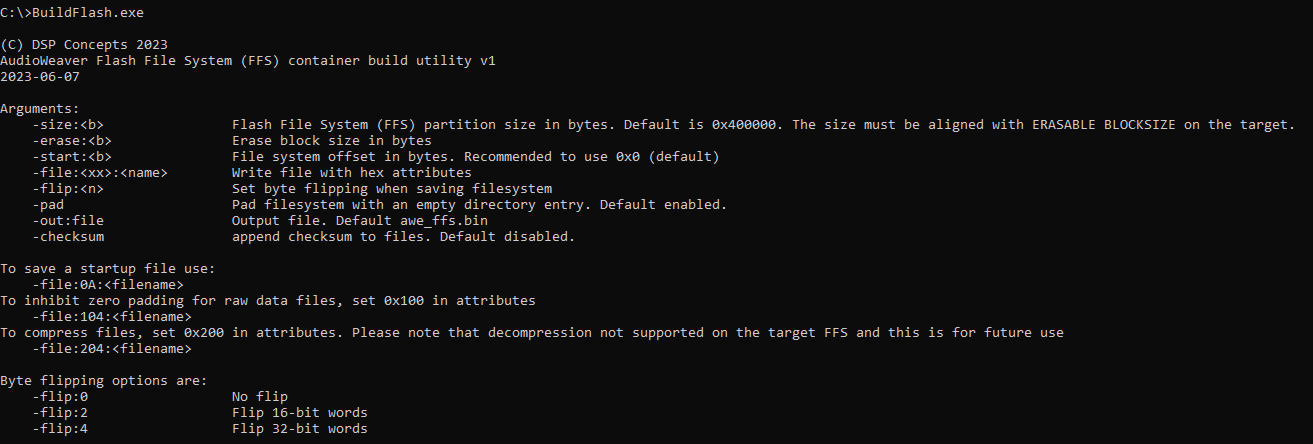 BuildFlash Help
The following options should be used when using BuildFlash.exe:
| Parameter | Description |
|---|---|
| -size: | The size of the flash file system container in bytes. The size must be aligned with ERASABLE BLOCKSIZE on the target where the FFS container going to be deployed. |
| -erase: | The erasable block size. Default is 0x10000. This is just internal purpose only and has no impact on the target. |
| -start: | The start offset where FFS begins. Default is 0x0 and recommended to set at 0x0 for portability across different target options of start offset. i.e. on the target flash device, the container file (.bin) can be programmed at any offset. |
-file:<Attr>: |
The combination of attribute byte followed by the file name, in hex format. See valid values below. |
| -flip: | Used to flip the data bytes before writing into FFS container. AWE FFS supports 32-bit data in little endian format and if the file to be written has different endianness please use this option accordingly. |
| -pad: | To append one empty file system directory at the end. Default is 1, with padding enabled.} |
| -out: | The output file name. Default is 'awe_ffs.bin'. |
| -checksum: | To append each added file with a checksum at the end. |
In the -file: option, <Attr> is a 10 bit bitmask with the following options described in the low 8 bits:
| Attribute | Description |
|---|---|
| 0x02 | Startup File |
| 0x04 | Raw Data File (.wav etc) |
| 0x08 | Compiled Script (typically *.awb) |
The upper 2 bits have the following options:
| Attribute | Description |
|---|---|
| 0x100 | To avoid inhibit zero padding at the end of raw data files, set this bit field. |
| 0x200 | To compress the files before adding into the flash file system container. |
Example Script for Creating a Bin File
Using BuildFlash.exe's options, you can write a script that creates a binary file containing a few of the wave files included with Audio Weaver. The example below uses WAV files in the "Audio" sub-folder of your Audio Weaver installation and writes the bin file back to that same folder.
- appointed.wav
- bell.wav
- notification_light.wav
- notification_plucky.wav
Copy the code block below to a new file named BuildFlash.bat. Save and run this in in the Audio Weaver Binaries Folder, e.g. C:\DSP Concepts\AWE Designer 8.D.3.2\Bin\win32-vc142-rel\.
TODO supposedly the BuildFlash.exe is not intended for use with the SND Modules, so we should choose something besides WAV files to show its use.
TODO make sure that the comments for FFSFileName are accurate.
@ECHO OFF
.\BuildFlash.exe ^
-size:0x3ff000 ^
-start:0x0 ^
-file:104:"..\..\Audio\appointed.wav" ^
-file:104:"..\..\Audio\bell.wav" ^
-file:104:"..\..\Audio\notification_light.wav" ^
-file:104:"..\..\Audio\notification_plucky.wav" ^
-flip:0 ^
-pad ^
-out:..\Audio\Flash_Player.bin
Pause
The generated Flash_Player.bin file can be used an input for the Argument ‘FFSFileName’ in the File Mem BUffer module used with FFS Wave Players in Native mode. [TODO - verify]
 Using the Bin file in Native Mode via FFS Wrapper